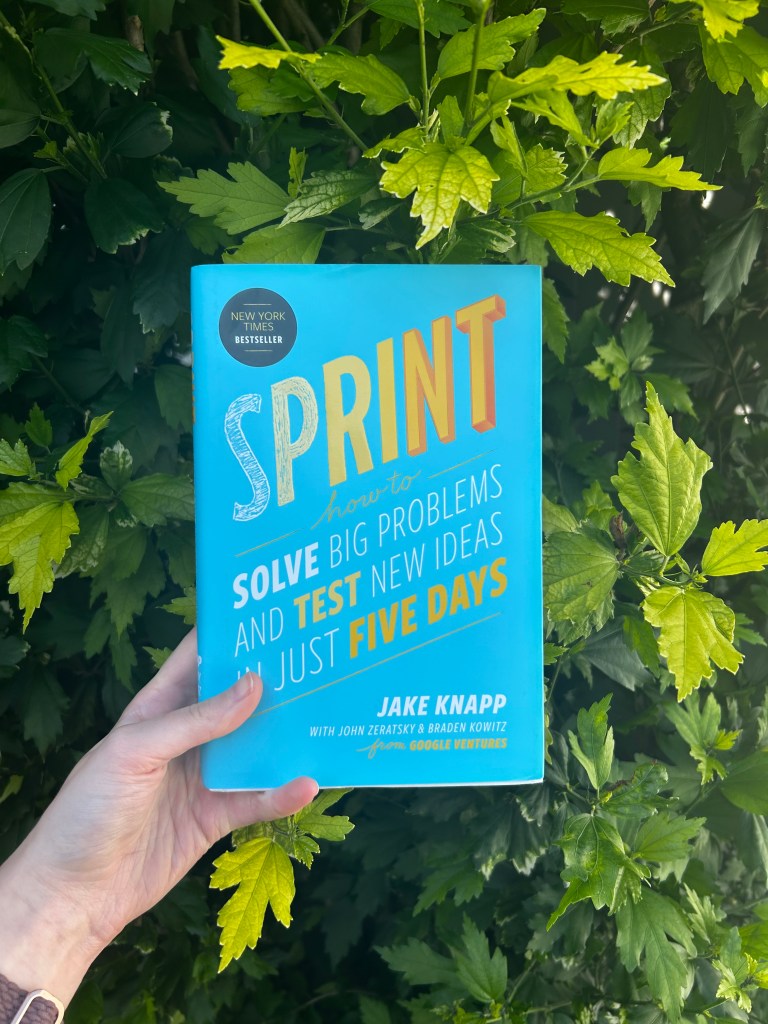
Author: KOMA designs

  • What is Design Thinking?

    What if I told you there was a way to design products or goods that would satisfy the needs and wants of both the consumer and the businesses responsible for bringing these products or goods to life? 

    Good News! There is, and it’s called Design Thinking. 

    Design Thinking is a design methodology that places the user, or human, at the center of the entire design process. Design thinking is different from other innovation and ideation processes in that it’s solution-based and user-centric rather than problem-based. This means it focuses on the solution to a problem instead of the problem itself.

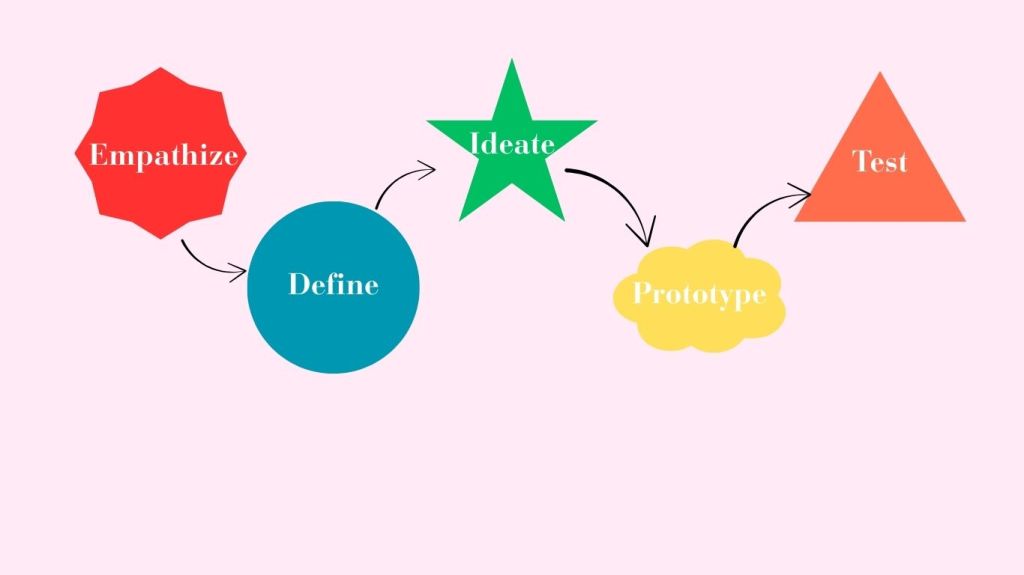
    In a basic definition, Design Thinking is a five-stage process. It consists of empathizing with the potential user of the product and listening to their needs and wants. Then, defining what the problem at hand is and answering the How Might We question to solve the problem. Following these two steps, we begin the process of ideating or sketching out very basic ideas and concepts of solutions, and there could be anywhere from 5 sketches to 500 sketches… that’s up to you and your design team!

    Then the final two stages are Prototyping and Testing. Prototyping is when you bring ideas to life. This can be in 2D or 3D, depending on your product or service. Then comes the fun part, to really get an idea of your product’s potential success by testing the prototype against your target users. Once the testing is done, you can bring any notes or recommendations back to the drawing board to reiterate your product and further tailor it for success. 

    The benefits of utilizing Design Thinking

    So now that we know what design thinking is, why does it matter in the world of design? 

    Design thinking can be useful for both consumers and the businesses that utilize this methodology. 

    For businesses, design thinking is beneficial in a variety of ways.

    • Time Saving: Design thinking allows you to speed up the entire ideation process of designing a product or service. Whether you choose to break the process down over its typical and recommended time frame of five days or speed it up to fit five hours, you are sure to walk away with a fully thought-out and tested design after the five phases are completed. 
    • Saves money: This is a huge component of why I believe design thinking should be utilized more by companies. You save money, and when it comes to businesses, that’s very important in our ever-changing economic times. Through the five stages of this methodology, you aren’t constantly scraping ideas and starting over and wasting money; you actually are saving money and potentially making more as you have insights from your target audience. 
    • Shows consumers you care: Since the first step is literally empathizing with your consumers over what needs to be fixed or what is missing, and then building an entire design around their thoughts and feelings. By understanding the person affected by a problem, you can find a more impactful solution. 

    Sources: Han, Esther. “What Is Design Thinking & Why Is It Important? | HBS Online.” Harvard Business School Online, 18 Jan. 2022, online.hbs.edu/blog/post/what-is-design-thinking
  • Design Thinking: A Crash Course for QU

    I met up with my partner, Grace, to take on a design thinking crash course. We set up a two-hour time slot after our first class meeting to work through the design thinking process in real-time. I must admit, I have only completed a project like this once, actually, through my previous class, which was literally called “Design Sprints”. While my previous sprint was very successful in gaining proper insights from our user testers for adjustments, I still felt like a design thinking beginner with lots to learn. 

    That’s where my crash course with Grace came in… 

    As we began the call, just getting to know each other a people before design thinkers, we discovered Grace and I have very different experiences at QU so far. Grace is a QU undergrad and now a master’s student. While I have not even set foot on campus. Where grace had more insights about the school’s physical environment, I had more experience with the online-only experience. While this could have been a dividing factor for our interview and entire crash course, we actually used this to our advantage. We began ideating ways we could make the entire QU online graduate program better and more inclusive for those who have years of QU under their belt and people like me who haven’t even seen the campus in person…just really great photos! 

    We both acknowledge the importance of getting the most out of our time in this program, so we wanted a way to create an even more beneficial program for all students. So we each took five minutes to come up with “problems” we both have experienced with QU. We then listened and took notes on each other’s findings. We then took our findings and insights and turned them into HWM questions or How Might We… questions. Grace and I combined both of our finds and experiences into one question. That question being, “How might we find a way to blend the QU undergrad and non-QU undergrad students to create a universal experience?” 

    Grace and I then began to actually come up with sketches and ideas for solutions. We choose to utilize digital drawings and images to reflect the online experience more accurately. We both thought of a buddy system or mentorship program. We then had to figure out who would be the mentor and what they would provide and give to the mentees in the program. This led us to further think on the buddy system and decide the most effective combination would be if it were between QU undergrad students returning to the university and non-QU undergrad students who are also pursuing a master’s but don’t have the background of QU previously. We then started ideating on what the mentorship would consist of. We decided the most beneficial mentorship program would consist of calls and virtual tours/hangouts between buddies to help make the online experience feel the most physical, even with the barrier of technology between the students and campus. Then, through the final stages of the interview, we prototyped and tested the program against ourselves and discovered an area of adjustment, maybe to have the buddy system begin at orientation and carry on throughout the length of the program. 

    While this was just a crash course, we both felt that if this were actually tested in a full sprint or test, it would be very successful for all parties involved.

    Check out Grace and I’s interview below!

  • DeepFakes: When AI Gets Scary

    Have you ever seen a video of Jennifer Anniston sitting in front of the camera, telling people if they click the link in the bio of the suspicious Instagram and put in their extremely personal information, they can win a free iPad Pro? 

    If you answered yes, congrats, you saw a DeepFake. 

    What is a DeepFake? 

    A DeepFake is a clip, video, or photo altered by AI. 

    How did DeepFakes start?

    The term DeepFakes was coined in 2017 by a Reddit moderator under the same moniker, who founded a subreddit for users to exchange deepfake pornography they had created using photos of celebrities and open source face-swapping technology. 

    Who can be affected by DeepFakes? 

    Here’s the scary answer… anyone can. 

    Anyone who has ever posted their photo or a video of themselves online can be affected by DeepFakes and AI in a negative and potentially life-damaging way. Some of the world’s most famous people have had their turn at being AI-altered to do or say false things 

    Some of these people include: 

    • Jennifer Anniston
    • Steve Harvey
    • Barack Obama
    • Taylor Swift

    The celebrities who were affected by DeepFake have even taken to urging Congress to pass legislation to protect people’s image and likeness from these potentially damaging images and videos

    Why should you care about DeepFakes?

    Deepfakes can be used to spread disinformation. Disinformation is the spreading of false information, and this can have lasting effects on people who may not have the media literacy to know what they are consuming is digitally altered. 

    For extra content on DeepFakes and to learn how to spot AI-altered images and videos, watch the video below for more information.

    Sources: 

    “Deepfake Technology: What Is It, How Does It Work, and What Can It Be Used For?” BBC Newsround, BBC, 15 May 2024, www.bbc.co.uk/newsround/69009887 Reagan, Gabe. “A Brief History of Deepfakes.” Reality Defender – Enterprise-Grade Deepfake Detection, June 2024, www.realitydefender.com/insights/history-of-deepfakes

  • Do Not Disturb: Our Responsibility as Consumers of Digital Media

    Have you ever blamed your phone for your constant scrolling? Have you ever stopped to ask, maybe it’s my fault? Maybe the tech company that designed my phone, tablet, or laptop has nothing to do with my scrolling habits? 

    As consumers of technology and media, we often blame the app or the device we are using rather than look inward at our usage and habits. What if the solution to our phone or social media addictions is right in front of us? Literally on the same device we are spending hours a day on? It is important to reflect on that while tech companies manufacture and design the products much like any other product, it is up to us as consumers to decide how much we use them and how they can impact us. 

    I also think it’s important as consumers to remember that, at the end of the day, companies are just doing their job, and it’s also up to us as consumers to create and maintain a healthy relationship with these products. Tech companies are also helping us by creating features on their devices to help us develop healthier habits and disconnect. Apple has created a monitoring system that tracks the amount spent on its devices and is even broken down by app usage. Apple also managed to create a more diverse variation of their “Do Not Disturb” feature, which allows the consumer to let certain apps and notifications be blocked for a specific time. When buying a new product from a tech company, we often spend hours or even days researching what the product can do for us, but how often have we stopped and considered how we are using the product?

  • Design and Project Management with Asana

    One of the most important aspects of design is project management. Without proper project management, your entire design process is asking to fail. Whether it’s branding for a client or an entire app mockup, project management is crucial to having a successful experience for both designers and clients or customers. This is why I chose to utilize Asana for all my project management needs.

    While there are many project management apps and software to choose from, I chose Asana because it is the most similar to how my brain thinks and processes a task or project at hand. Asana separates tasks into three sections: To Do, Doing, and Done. You can also view the whole project at a glance from the start to whatever your due date would be. I find this extremely helpful, as while I am a person who can focus on one task or issue at a time, I also constantly find myself planning for how to tackle tasks that are coming down the pike. 

    If, for some reason, my asana disappeared from the face of the earth, I would still manage my project and tasks in a similar way. Rather than having everything laid out digitally for me, I have three large Post-its or pieces of paper for the To Do, Doing, and Done, and a calendar to be able to break each section of the project down piece by piece to make sure we are managing all areas in a timely manner. 

    I’d recommend that anyone looking for project management software first ask themselves how they personally organize their projects and tasks to achieve their end goal- whatever that may be. Then investigate and really take some time with a software that’s navigation feels intuitive to you, and how you would break down in your brain or on a piece of paper.

  • I Gave Up the News for Five Days and Here’s What Happened

    I chose to give up the news for five days. 

    In complete honesty, I had a list of options to pick from: Instagram, Snapchat, TikTok, Facebook, Texting, Phone Calls, or even my phone completely. I chose the news because I at first thought it was what I checked the least, and when I checked it, I was left most of the time feeling overwhelmed and defeated by all that chaos that was going on in the world around and rarely felt relief after checking the news. So I figured, let me use this as an excuse to not feel guilted into seeing what was going on in the world and disconnect for five days. 

    Through the five days, I kept notes on my phone of my thoughts, feelings, and times I felt like I wanted to check the news. I started to make discoveries even on the first day of the challenge. Firstly, I realized my pattern that exists between social media and the news. When I would see a story on social media posted by a media outlet, I wouldn’t go to the comment section to see what others were saying about the story; I would want to open Safari and look up the story and gather more information than what the Instagram bio or tweet had provided. Then my next discovery was often that the pattern or habit occurred throughout the days/ week I did the challenge. I will give myself credit as I discovered that I don’t take what I see on social media as the immediate truth or for face value, given the recent issues of fake news and AI on social media. And much to my surprise, my main discovery was how much I depended on the news and staying up to date on the news to feel included or a part of society. 

    This challenge ended up being surprising to me, as I discovered that while I originally thought I wasn’t dependent on the news like the people around me. I discovered and realized that I use the news to actually connect with those around me and feel a part of society.

  • My Digital Distractions

    Time to be honest…I am constantly distracted. 

    After reflecting and talking about digital habits earlier in the week, I realized just how frequently I am distracted by the digital devices that I surround myself with. I was also prompted to think deeper about my digital habits (or distractions) after reading an article by Michael Harris. Michael quoted another author Nicholas Carr by saying, “we become ‘more intolerant of moments that pass without the arrival of new stimuli’” (Harris). This line of the article stuck out to me because as I was reading this exact line, the music I turned on before sitting down to read started to lag, and I got frustrated. I then realized that the quote was telling the harsh truth. We are constantly being stimulated in this digital age, and it’s become normalized. I can’t even sit still in silence and read an article or a book without an extra form of stimulus. Sometimes it’s music, other times I’ve turned on the TV to read a book. 

    This caused me to sit for a moment and pause to reflect on the habits I have with digital media. Through my reflection, I discover I am hardly ever just still doing one activity. If I am walking in nature, my phone is playing music. If I am working, I have a podcast queued up. If I am bored, rather than talk to a loved one, I open Instagram. I hate to admit that I have had moments of working on my computer, while my phone was playing music and my TV was on mute in the background.

    While I do have to give myself credit, I managed to implement a rule of leaving my phone in another room when it’s time to eat dinner with my family nightly. Most times, we have the TV on in the living room just an earshot away. Then, when dinner is done, I immediately return to my phone to see if I missed anything in the 30 minutes I was away from it. 

    I used to think, because I didn’t spend hours on social media anymore, that I too was immune to the constant digital stimuli, but looking at my habits from a bird’s eye view, I can’t recall the last time I sat in complete silence focusing on one task at hand. 

    Sources:

    Harris, Michael. “I Have Forgotten How to Read.” The Globe and Mail, The Globe and Mail, 9 Feb. 2018, http://www.theglobeandmail.com/opinion/i-have-forgotten-how-toread/article37921379/

  • In The Generation of Stolen Focus

    While reading the beginning chapters of Stolen Focus by Johann Hari, a quote stuck out to me. Hari wrote when discussing the motto for this constantly distracted generation that it could be surmised to “I tried to live, but I got distracted”(Hari, Pg.8). This quote struck me so deep when talking about this current generation to the point I literally wrote in my copy of the book “crazy..”. 

    The premise of the book is how Hari went about researching the issue of attention and loss of focus in today’s digital age. Hari began this journey by personally removing himself from all forms of the internet. Even in the first few chapters of the book you can see the effects this had on his research from his personal antidotes on the changes from his thoughts to choices he makes in everyday life. Hari’s digital detox was inspiring to me to reflect on my own digital detoxes. While Hari points out his own privilege to be able to remove himself from the “wired” world, I have found similarities in my shorter digital detoxes. 

    In complete honesty, much like Hari, I started these detoxes after being frustrated with how attached I had become to my own digital world. I typically try to go every once and while going a day without using social media or really being on my phone. I also notice I do this during times where the digital world I am in becomes too much and over stimulating with messages and content. And it typically comes with a cycle of the same emotions. First I am anxious and feeling like I am missing out on the world (ironic huh?), then I am able to drop into a present space and begin to focus on my external world and go about my day with the urge to check my phone or instagram few and fleeting during the day,then by the time night rolls around i wonder what i was so anxious about to begin with. 

    Hari’s personal experience with his digital detox makes me want to reflect further on my own experience with digital spaces and distractions. While i may not be able to cut myself off completely from the world the same way he did, i can certainly reflect on my habits and bring them back to the drawing board to reevaluate healthy ways to function in this distracted generation and not let life pass me by while i am looking down at my phone.

    Sources:

    Hari, Johann. Stolen Focus: Why You Can’t Pay Attention–and How to Think Deeply Again. Crown, 2022.

  • WalletWize: Financial Literacy for Gen Z: A Case Study

    Introduction

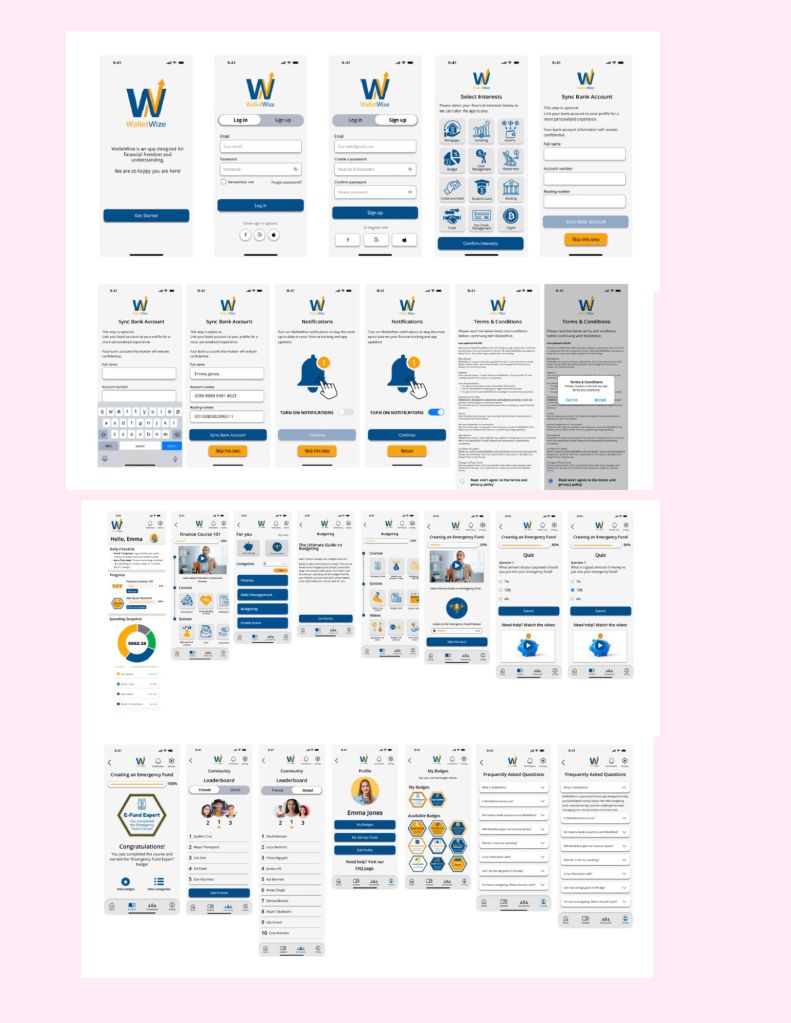
    In today’s digital age, financial literacy has taken a backseat in people’s minds as we are constantly bombarded with social media, text messages and other platforms. My team wanted to design a app that brings financial literacy and its importance to the most digital savvy generation. We set out on the task of making a intuitive app that will teach Gen-Z the basics and importance of being financially literate and responsible.

    Design Sprint Phases

    Phase 1: Map and Sketch: We defined our “How Might We..?” questions and began to sketch out our long term goals for the app.

    Phase 2: Decide and Storyboard: We used a series of heat-mapping and voting on a variety of designs to establish a concept of our prototype.

    Phase 3: Prototype and Refine: We then began designing the prototype, each taking a aspect or role we felt we could execute best to bring the prototype to life.

    Phase 4: Test and Collect: We conduct five user testing sessions with our target users for app (Gen-z) and gather data to refine our app.

    Phase 5: Reflect and Report: We then reflected on feedback and used the data to further develop deliverables and our final report.

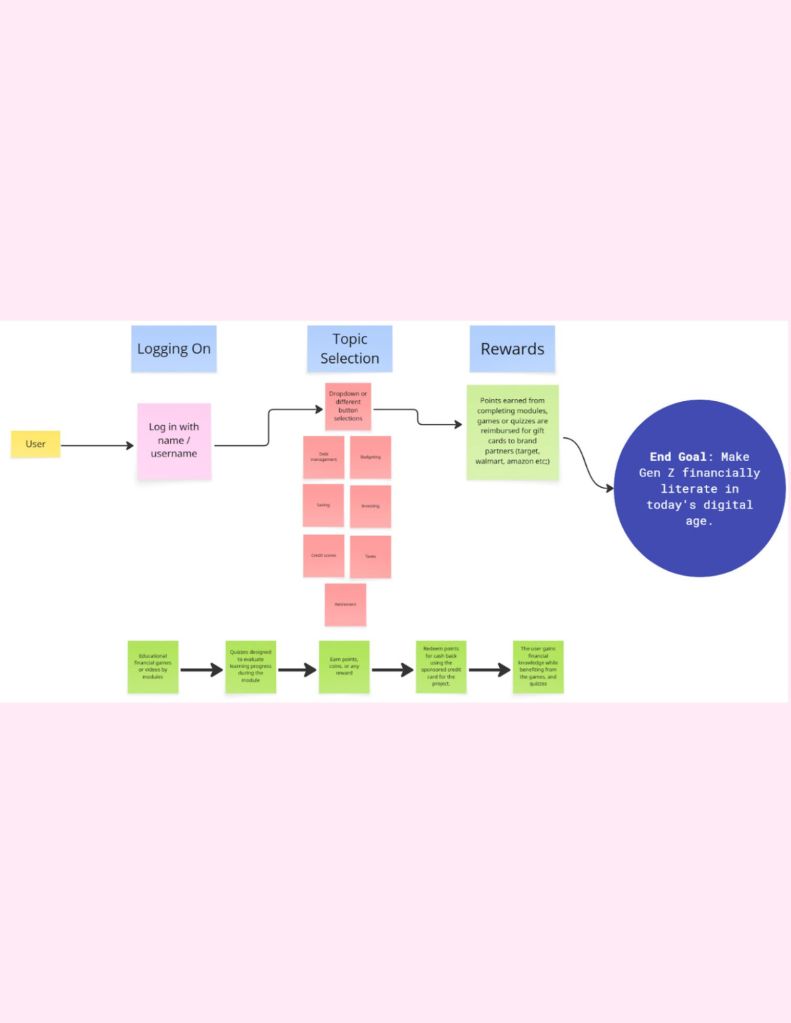
    Mapping

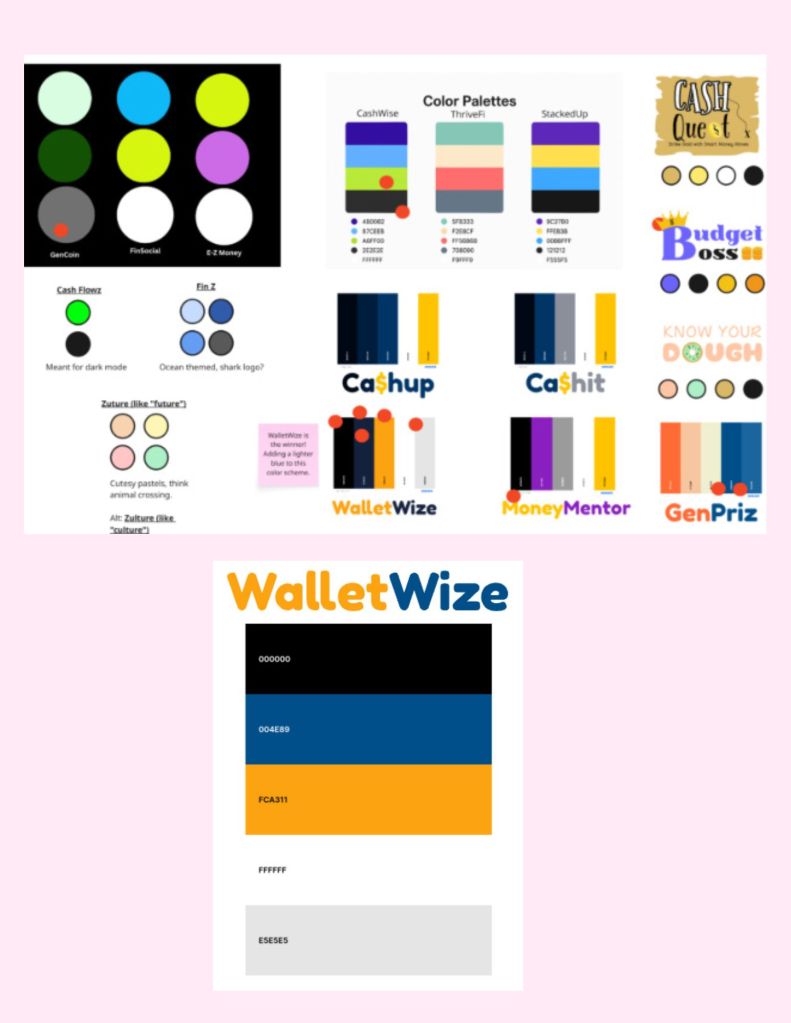
    Logo and Color Scheme Concepts

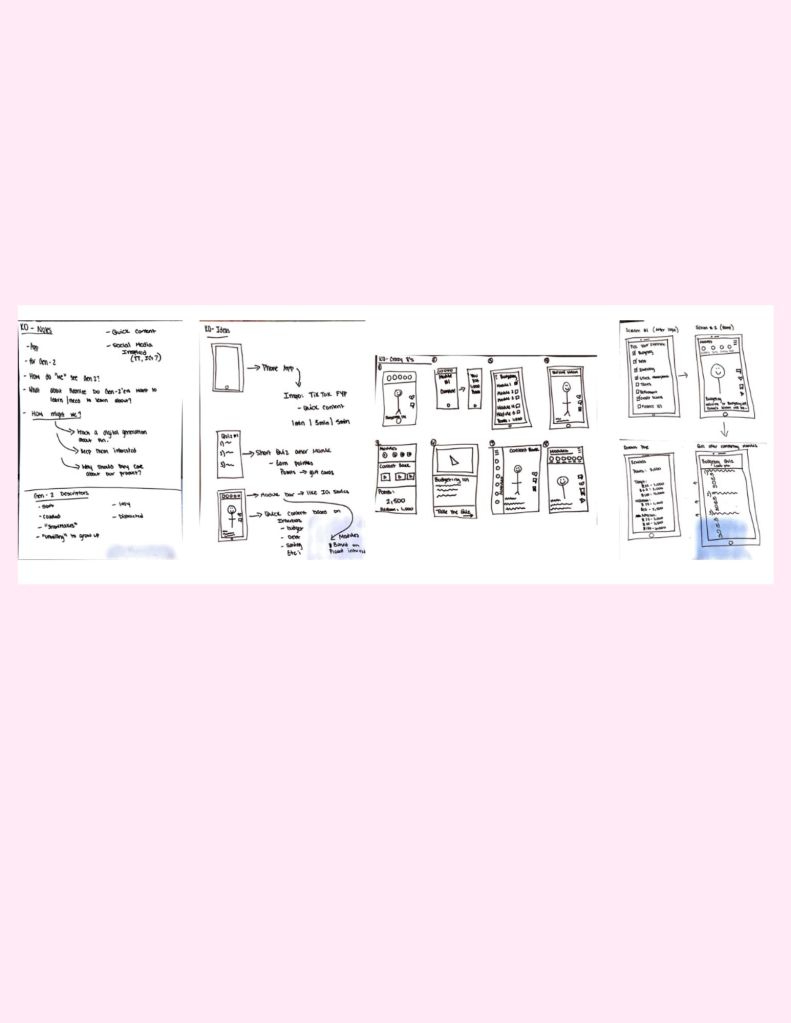
    Rough Sketches

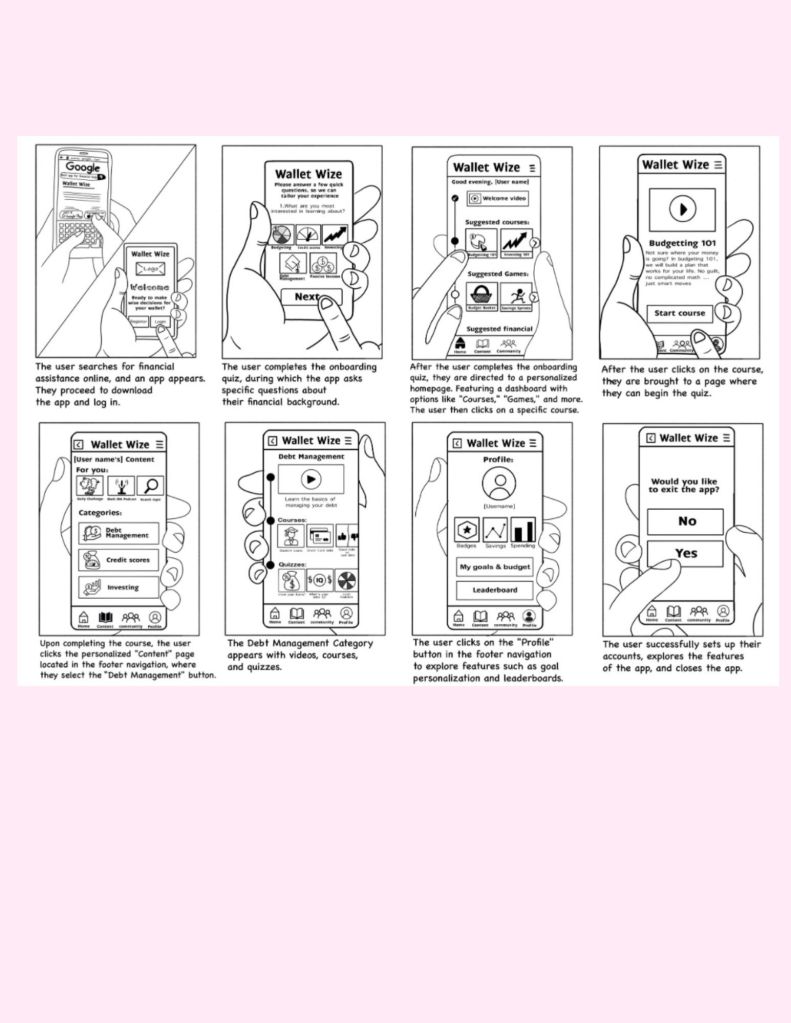
    Storyboarding

    Prototype Development

    Watch the video above to see our prototype walk through

    Results

    Our design sprint resulted in a clear prototype of WalletWize. Our user testing sessions showed promise with the app and our target users. However we did have a few areas of the app that needed further development and refinement. The overall feedback from the users were positive. Users made it clear to us that they liked the color scheme and the design of the app itself and found the majority of it easy to navigate. We were able to gather both quantitive data and qualitative data through the time it took to complete the four tasks in our user test and the feedback we received during and post testing.

    Learnings and Outcomes

    After the user testing and the sprint was complete, we as a team reflected over the data we received. Our problem areas were the following: the majority of users struggled with navigating to complete the budgeting sample module we created and the quiz connected to it. The next problem area was making our FAQ page more accessible and visible. We then had a user recommend that we move the FAQ to the bottom of the home page. Overall, users told us if we fixed these areas of the app it would make the app better and more intuitive for use.

    Conclusion

    In conclusion, as a team we were able to complete a design sprint to answer our ” How Might We…?” questions to teach Gen-z about the basics and importance of financial literacy while tailoring it to the generation’s natural ability to navigate digital platforms. While there are aspects of the app that need to be refined again, the prototype and the design sprint served its purpose of saving time and money and getting real time feedback from our target users to make a product that is usable for Gen-z.

    Please view below for our full report on WalletWize.

  • My User Testing Experience

    Today, I wanted to discuss my own experience with User Testing. In complete honesty, I knew very little about User Testing before my most recent User Testing phase. I always knew why companies wanted to user test before taking a new product to market. I was always on the user side, or designing the product and passing it along to a superior who would test it and never hear back until it was time to adjust. 

    This most recent round of User testing allowed me to wear multiple hats and see the whole process, not just the beginning or the end feedback. My team and I were testing the prototype of an app that would teach Gen-Z about financial literacy and making smart financial choices. Our app, WalletWize, was a medium fidelity prototype. We then had a total of five users to get the beginner insights on what needed to be adjusted in the app. Throughout the testing session, I wore hats for the session timer, to time each task, and to see how long our users took to complete them in order to make sure the app is easy to navigate. 

    Then I was an interview facilitator and got to facilitate a user test. This was an area I was excited to participate in. My findings in this area were that while following the protocol of not giving our users direction outside of the task instruction, like “navigate and complete the emergency fund quiz,” it was honestly awkward for me as the facilitator when the person would struggle with the task and ask for help. My team agreed for the sake of the most accurate testing, we wouldn’t give hints to help a struggling user. But as humans, especially wanting to be a welcoming person, to create a positive testing environment, it was difficult to see people struggle with certain tasks. However, it gave us a lot of insight into how someone who was on the design side of the app would be able to navigate it. 

    After my turn of facilitating a test with a user, I got to sit back and listen to the other four tests and take notes. This is where I got to observe what our target users thought and felt about what we had created. Through note-taking and actively listening to our users, it allows me to see the benefits of user tests. A human-centered approach offers a greater ROI, from increased revenue and conversion rates to customer retention. Investing time and resources into UX will also help you create brand advocates. My team can take the feedback given to us from the users and go back to drawing to further refine and shape our app for the best possible creation for both the users and us as designers. 

    I have included the slide deck of notes and feedback data my team collected after our test session below, as well as a video for further background on the concept of User Testing. 

    Sources: 

    “What Is the Purpose of User Testing: Benefits of User Testing: Ui Ux.” What Is the Purpose of User Testing | Benefits of User Testing | UI UX, 14 Sept. 2022, www.usertesting.com/blog/what-purpose-user-testing