Tag: Sprints

  • WalletWize: Financial Literacy for Gen Z: A Case Study

    Introduction

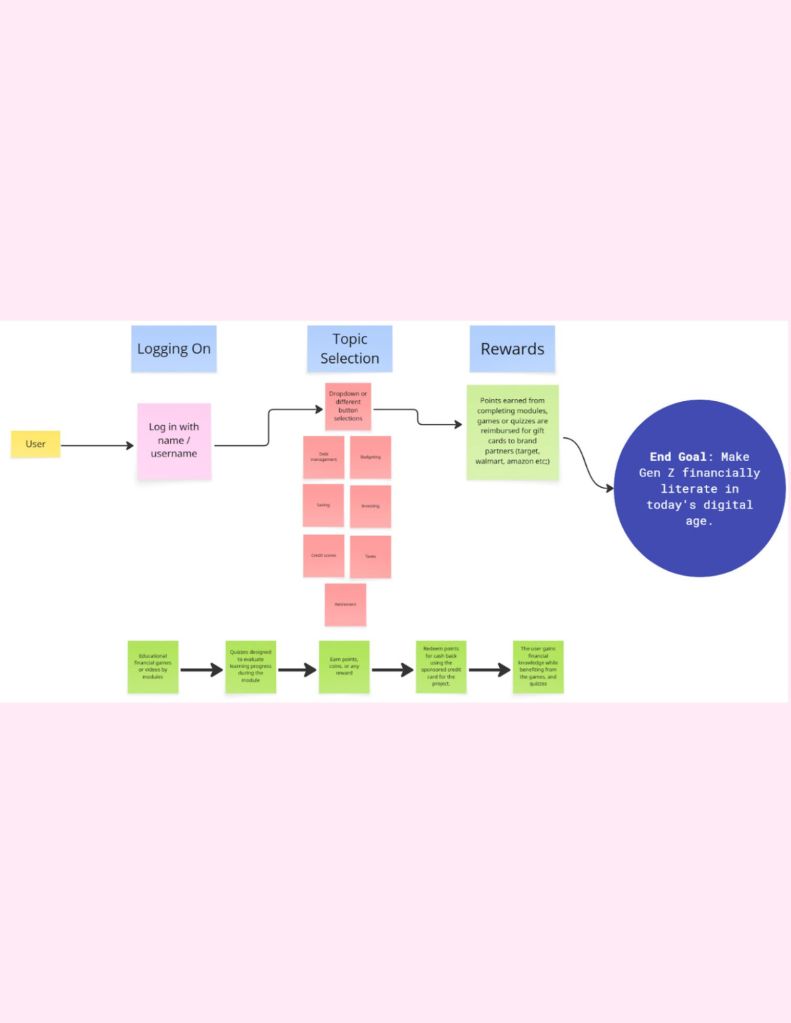
    In today’s digital age, financial literacy has taken a backseat in people’s minds as we are constantly bombarded with social media, text messages and other platforms. My team wanted to design a app that brings financial literacy and its importance to the most digital savvy generation. We set out on the task of making a intuitive app that will teach Gen-Z the basics and importance of being financially literate and responsible.

    Design Sprint Phases

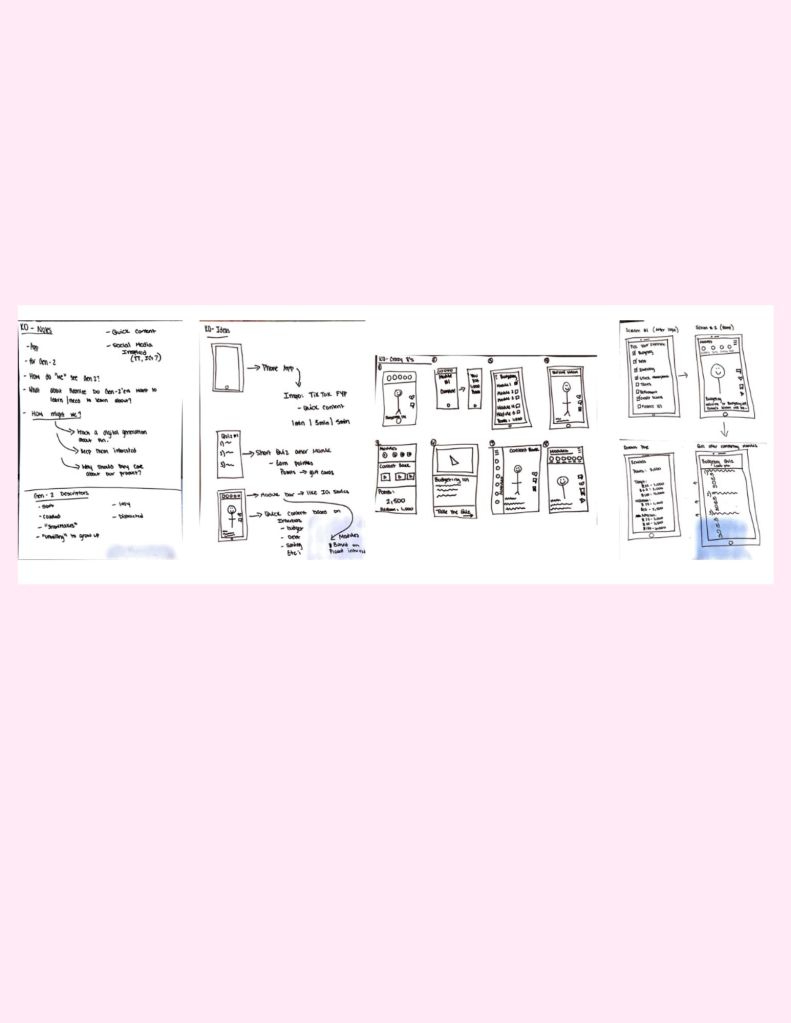
    Phase 1: Map and Sketch: We defined our “How Might We..?” questions and began to sketch out our long term goals for the app.

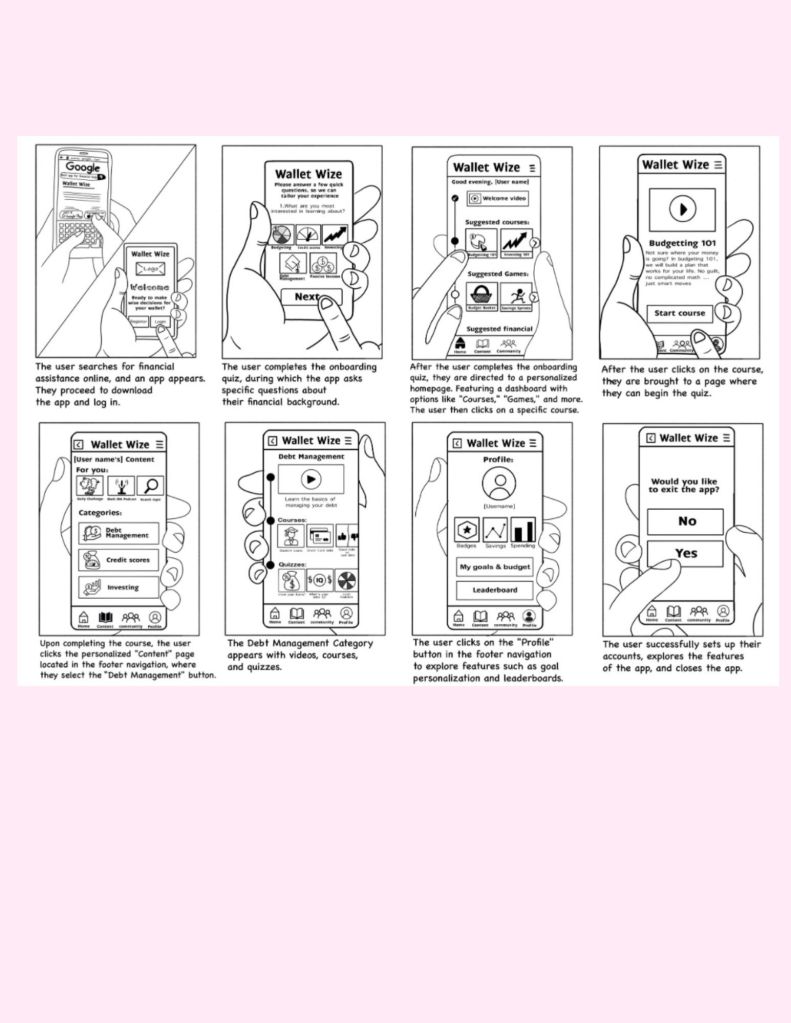
    Phase 2: Decide and Storyboard: We used a series of heat-mapping and voting on a variety of designs to establish a concept of our prototype.

    Phase 3: Prototype and Refine: We then began designing the prototype, each taking a aspect or role we felt we could execute best to bring the prototype to life.

    Phase 4: Test and Collect: We conduct five user testing sessions with our target users for app (Gen-z) and gather data to refine our app.

    Phase 5: Reflect and Report: We then reflected on feedback and used the data to further develop deliverables and our final report.

    Mapping
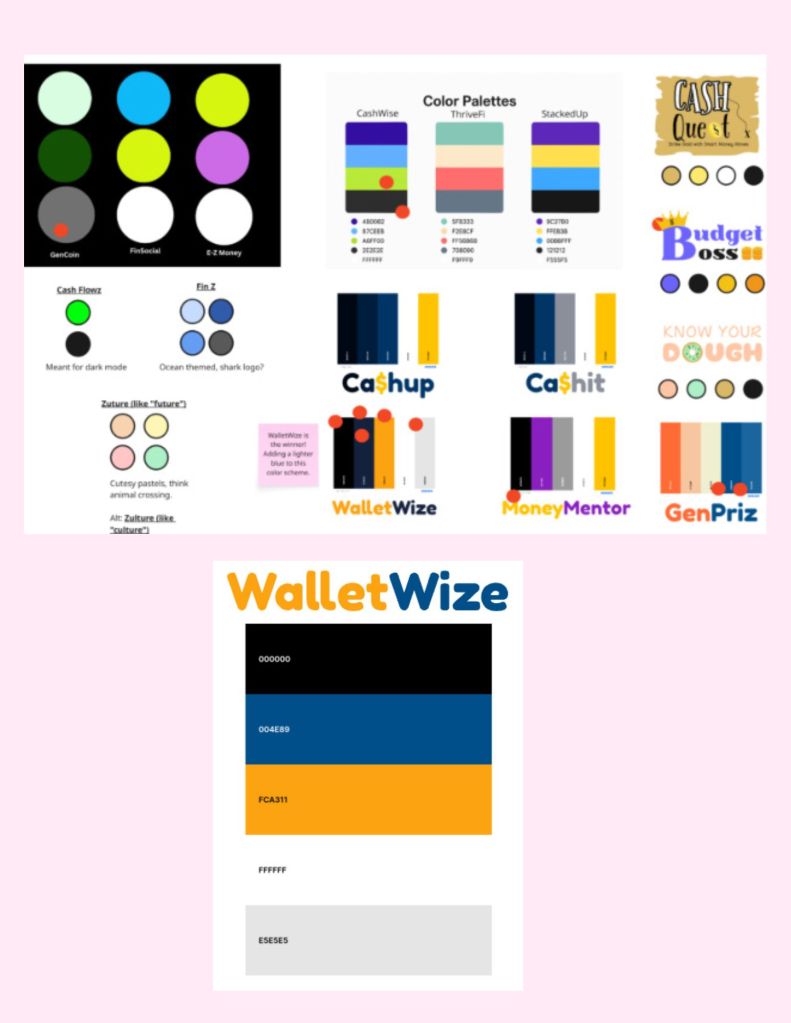
    Logo and Color Scheme Concepts
    Rough Sketches
    Storyboarding
    Prototype Development
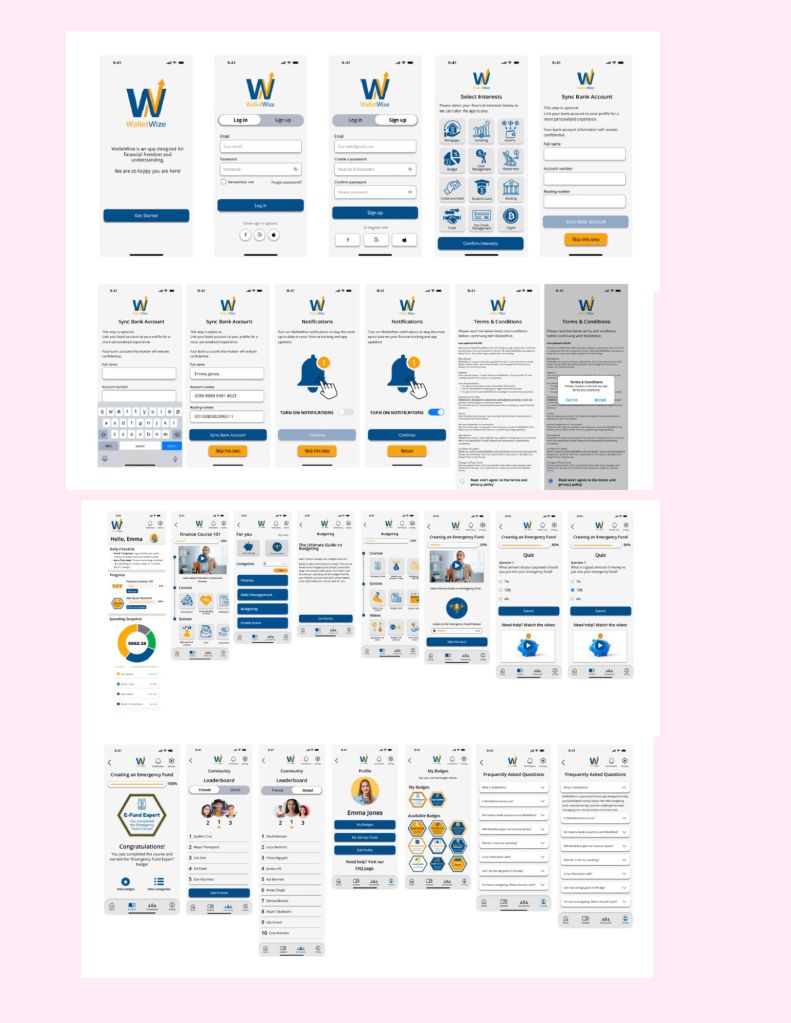
    Watch the video above to see our prototype walk through

    Results

    Our design sprint resulted in a clear prototype of WalletWize. Our user testing sessions showed promise with the app and our target users. However we did have a few areas of the app that needed further development and refinement. The overall feedback from the users were positive. Users made it clear to us that they liked the color scheme and the design of the app itself and found the majority of it easy to navigate. We were able to gather both quantitive data and qualitative data through the time it took to complete the four tasks in our user test and the feedback we received during and post testing.

    Learnings and Outcomes

    After the user testing and the sprint was complete, we as a team reflected over the data we received. Our problem areas were the following: the majority of users struggled with navigating to complete the budgeting sample module we created and the quiz connected to it. The next problem area was making our FAQ page more accessible and visible. We then had a user recommend that we move the FAQ to the bottom of the home page. Overall, users told us if we fixed these areas of the app it would make the app better and more intuitive for use.

    Conclusion

    In conclusion, as a team we were able to complete a design sprint to answer our ” How Might We…?” questions to teach Gen-z about the basics and importance of financial literacy while tailoring it to the generation’s natural ability to navigate digital platforms. While there are aspects of the app that need to be refined again, the prototype and the design sprint served its purpose of saving time and money and getting real time feedback from our target users to make a product that is usable for Gen-z.

    Please view below for our full report on WalletWize.
  • My User Testing Experience

    Today, I wanted to discuss my own experience with User Testing. In complete honesty, I knew very little about User Testing before my most recent User Testing phase. I always knew why companies wanted to user test before taking a new product to market. I was always on the user side, or designing the product and passing it along to a superior who would test it and never hear back until it was time to adjust. 

    This most recent round of User testing allowed me to wear multiple hats and see the whole process, not just the beginning or the end feedback. My team and I were testing the prototype of an app that would teach Gen-Z about financial literacy and making smart financial choices. Our app, WalletWize, was a medium fidelity prototype. We then had a total of five users to get the beginner insights on what needed to be adjusted in the app. Throughout the testing session, I wore hats for the session timer, to time each task, and to see how long our users took to complete them in order to make sure the app is easy to navigate. 

    Then I was an interview facilitator and got to facilitate a user test. This was an area I was excited to participate in. My findings in this area were that while following the protocol of not giving our users direction outside of the task instruction, like “navigate and complete the emergency fund quiz,” it was honestly awkward for me as the facilitator when the person would struggle with the task and ask for help. My team agreed for the sake of the most accurate testing, we wouldn’t give hints to help a struggling user. But as humans, especially wanting to be a welcoming person, to create a positive testing environment, it was difficult to see people struggle with certain tasks. However, it gave us a lot of insight into how someone who was on the design side of the app would be able to navigate it. 

    After my turn of facilitating a test with a user, I got to sit back and listen to the other four tests and take notes. This is where I got to observe what our target users thought and felt about what we had created. Through note-taking and actively listening to our users, it allows me to see the benefits of user tests. A human-centered approach offers a greater ROI, from increased revenue and conversion rates to customer retention. Investing time and resources into UX will also help you create brand advocates. My team can take the feedback given to us from the users and go back to drawing to further refine and shape our app for the best possible creation for both the users and us as designers. 

    I have included the slide deck of notes and feedback data my team collected after our test session below, as well as a video for further background on the concept of User Testing. 

    Sources: 

    “What Is the Purpose of User Testing: Benefits of User Testing: Ui Ux.” What Is the Purpose of User Testing | Benefits of User Testing | UI UX, 14 Sept. 2022, www.usertesting.com/blog/what-purpose-user-testing

  • Blue Bottle Coffee: A Case Study for Design Sprints Usefulness

    In October of 2012, Blue Bottle Coffee reached out to the Google Ventures Team to have the fellow co-creators of the Design Sprint, John Zeratsky and Braden Kowitz, help them answer their problem at hand. Blue Bottle Coffee and its CEO, James Freeman, wanted to create a more personalized experience for their customers on their website. James wanted the customers who visited their site for the first time or the twentieth time to have the same experience they’d have in one of their stores. This led the Blue Bottle Coffee team, along with John and Braden, on a week-long sprint to answer the question of: 

    How might we elevate the Blue Bottle Coffee shopping experience online?

    The team went through the five-day process of the design sprint, and they discovered that the best solution to this problem was to bring the hospitality that Blue Bottle Coffee was known for in-store to the digital space. They did this by prototyping three different websites for their customers to test and respond to. They also chose to keep the brand a secret from the customers who were the testers. They heard comments back from their customer, ranging from a site being cliche to not having the customer’s full trust in the site, which would affect the sales on the site. They were surprised to learn that customers preferred a site with more information and knowledge on each type of coffee, validating the brand as coffee experts. Once the week-long process was over and the insight and feedback from customers were gathered, John and Braden followed up with Blue Bottle Coffee “to help coach them through detailed design and development of the website. In addition to feedback and advice, we created wireframes to summarize and communicate the most important content on each page.” 

    “A few months later, Blue Bottle launched their new website, and their online sales growth doubled- With a bigger team and new technology, they expanded the web store and began experimenting with new offerings. They knew it would take years to get the online store right-but in the sprint, they started on their path”(Knapp, Pg.26).  This goes on and continues to validate the importance and efficiency of the Design Sprint Process. This process saved the company not only time but also resources and money. The Design Sprint allowed Blue Bottle Coffee to race directly to (pun intended) what their target audience (i.e., Coffee drinkers who want a customized shopping experience) wanted and needed from their online shopping experience, which boiled down to expertise, hospitality, and a trustworthy company to put their money into. And that’s exactly what happened. 

    Design Sprints like this allow for other companies and even people to feel confident that the time and creative investment that is clearing your week schedule and collaborating with your co-workers will leave you and your company with actionable results that may lead to a great payoff for the company.

    Looking for more? Watch this Video!

    Sources:

    Gv. “Case Study: Blue Bottle Sprints with GV.” Medium, Sprint Stories, 6 July 2017, sprintstories.com/case-study-blue-bottle-sprints-with-gv-f452789b8ecd

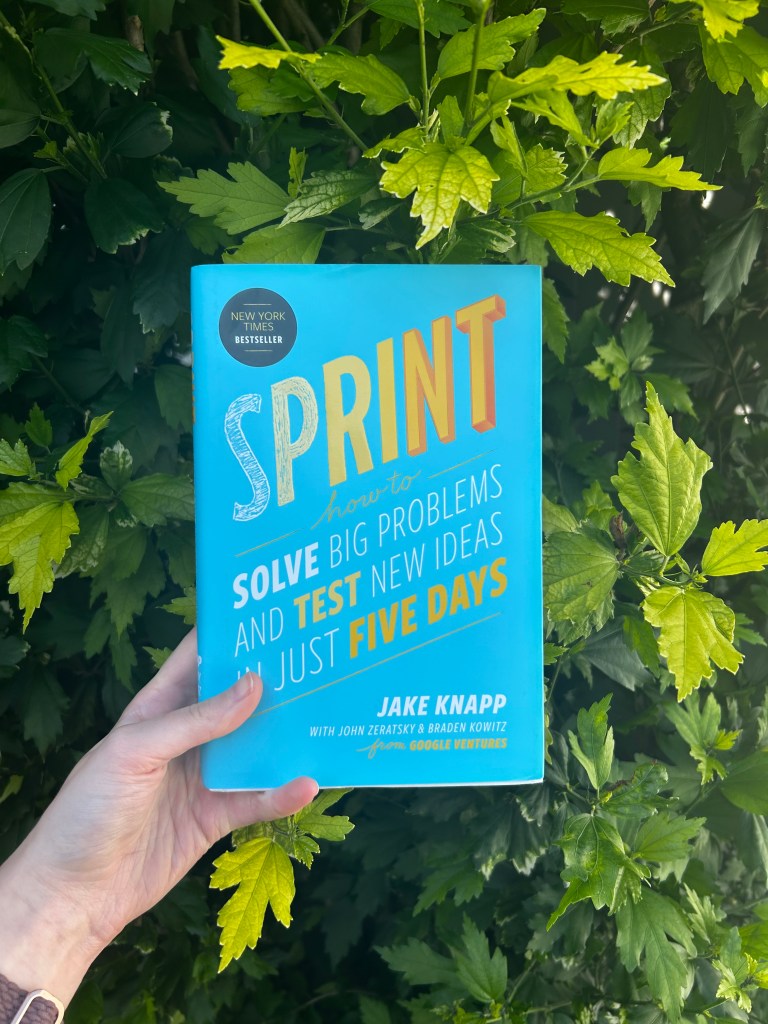
    Knapp, Jake, et al. Sprint: How to Solve Big Problems and Test New Ideas in Just Five Days. Simon & Schuster, 2016.

  • Roles In A Design Sprint

    Now that you know what a sprint is and whether you need one (hopefully the answer is yes), it’s time to develop your Design Sprint team. But who or what makes up the perfect Design Sprint team? Let’s dig into it!

    How Many Roles in the Team are there?

    Regardless of an in-person or remote Design Sprint, it has been tested by the creators of the Design Sprint themselves to find the perfect number of people for a design sprint. As the co-creator of Design Sprints and author, Jake Knapp wrote in the book “Sprint”, “we’ve found the ideal size for a sprint to be seven people or fewer. With eight people, or nine, or more, the sprint moves more slowly, and you’ll have to work harder to keep everyone focused and productive” (Knapp, pg. 33).  The seven people you chase should be a mix of people. The most productive way to run a Sprint is with a diverse group of team members. “If your team grows larger than seven members, you put yourself at risk of taking on too many personalities and opinions. If it’s significantly smaller than that, though, the team members are likely to feel overworked and stretched too thin.

    What are the seven roles for a Design Sprint? 

    Facilitator: This is the person who will be running the Design Sprint. This person will be responsible for the week moving effectively and swiftly to get to the end goal of Friday of testing a prototype of your product, service, or good. This person must also be good at navigating and de-escalating conflict as it may arise through the process. This role may not be actively involved in the sprint process, but they are still needed to keep the process moving along

    Decider: The decider is often confused with the Facilitator; however, these two important roles do differ and serve their own purpose. This person must be able to make swift, unbiased decisions. This role is typically reserved for the higher-ups in a company, like CEOs, managers, or product/project leads. If you choose someone with a busy schedule who can necessarily swipe their whole week calendar like a CEO, the Decider can assign one to two other people to act for them while they are away. 

    Designer: This person should be well-versed in UX and visual design. They will be responsible, along with the Developer/ Engineer, to create the prototype, marketing assets, and any other physical or digital materials needed. They will also help the team reach their visual solution for the problem at hand. 

    Developer: This role can also be referred to as the Engineer. They will develop the technical assets needed to bring the prototype to life. This role is necessary to make sure the end goal is achievable and realistic for the company in life past the Sprint. 

    UX Researcher: This person is responsible for gaining insight into what your target audience’s needs are from your prototype. They may collect data from the target audience to make sure the team can make decisions based on their needs. 

    Subject Matter Expert: This role is dedicated to the expert in whatever field or industry in which your product, good, or service will innovate. This person is responsible for providing insights that the team member may not otherwise know of throughout the sprint process. 

    Marketer: This role is similar to and will work closely with the Subject Matter Expert. This person is responsible for marketing your design to your target audience and placing your design in a competitive market through trend forecasting and deeply understanding your target audience.

    Now that you see the roles and what they entail, it is time to assign your team member their roles. 

    Still confused about the roles of a Design Sprint team? Watch this video below!

    Sources:

    Knapp, Jake, et al. Sprint: How to Solve Big Problems and Test New Ideas in Just Five Days. Simon & Schuster, 2016.

    Turner, Theresa. “How to Assemble a Design Sprint Team.” Trackmind Solutions, 20 Apr. 2023, http://www.trackmind.com/design-sprint-team/

  • Are You Ready to Sprint?

    How do you know if your company or you are ready to sprint?

    Sign#1: You’re onboarding a new product/service:

    If you or your company is getting ready to launch a new product or service. It may be a crucial time to conduct a sprint. As much as some co-workers may moan about having to clear a week from their calendar (while others jump at the chance to clear their calendar), it may save you or your company hundreds, thousands, or even millions of dollars and avoid a failure of a launch.

    Sign #2: You’re stuck with a problem and can’t come up with a solution:

    One of the key aspects of the Design Sprint is Ideation. It’s so crucial that it has its own day dedicated to it in the five-day process. Ideation allows everyone to get creative and utilize their problem-solving skills. Due to each role involved in the sprint, you may have someone who is more analytical come up with the perfect solution, while someone more creative can think of a concept but not be able to fully execute it. One of the key things that makes a Design Sprint worthwhile is the opportunity to come up with dozens of solutions and not be limited by a narrow scope. 

    Sign #3: You’re ready to innovate: 

    Innovation is one of the best reasons to utilize the design sprint format. Not only does the Design Sprint save you money when launching either a first-time product or an upgrade to an already loved product/service, but it can also save your company precious time. No more waiting weeks for your boss to give the go-ahead on an email or waiting for your co-worker to get a call back from IT. After the week is up, you’ll be able to walk away with a fully developed and tested prototype. While you may have to adjust and change certain aspects after the sprint is done, and you have feedback from a target public, you’ll be able to speed right up the finish line and be ready to launch. 

    What do you need to Sprint?

    Once you decide you’re ready to sprint, the next step is to gather the materials.

    “Designing the ideal workspace for running a sprint involves a careful balance of functionality, creativity, and collaboration.” (Hastings, pg.22)

    Whether it’s in person or a remote sprint, make sure you come with the following materials:

    • A whiteboard (physical or Miro will do)
    • Sticky Notes (Miro has these too!)
    • Markers/pens
    • A timer for thinking sessions
    • Snacks and Beverages (for Brain Power)
    • An open, inviting layout and furniture (to make everyone feel physically included in the Sprint)
    • A speaker (Music may help get the creative juices flowing)
    • Tech Set-up (proper software for design and engineering the prototype and collaboration software, i.e, Miro, Google Suite, Microsoft Suite) 

    Once you have gathered all these materials and reflected on whether you require a Design Sprint, you’re ready to gather your team members and assign roles…which we’ll be discussing next!

    Sources:

    Hastings, Pattie Belle. The Sprint Handbook. Mindful Marks, 2024. 

    Pollock, Xander. “How Do I Know If It’s the Right Time to Run a Design Sprint?” The Sprint Book, www.thesprintbook.com/articles/how-do-i-know-if-its-the-right-time-to-run-a-design-sprint. Accessed 30 May 2025.

  • What is a Design Sprint?

    Okay, so let’s do a science experiment quickly. Clear your entire work calendar for one week from Monday to Friday, 9:00 AM to 5:00 PM.

    Did you just have a feeling of panic rise up in your body? Did you immediately think, “No way, I have too many problems to solve and issues to fix to clear an entire week of my calendar”? 

    What if I told you that there was a methodology of solution-focused thinking that would help you solve all of those problems and even be able to avoid future failures? That’s where Design Sprints come in.

    What are Design Sprints?

     Design Sprints were invented by Jake Knapp, John Zeratsky, and Braden Kowitz in 2009. According to Knapp, “It’s a ‘greatest hits’ of business strategy, innovation, behavioral science, design and more-packaged into a step by step process that any team can use” (Knapp, pg.9). A Design Sprint is a five-day program with five phases to facilitate design thinking in a way to minimize risks and even failures when releasing a new product, service, or feature. The five phases in a Design Sprint consist of Mapping, Sketching, Deciding, Prototyping, and Testing. Each phase has its dedicated day, allowing for careful and thoughtful thinking at each phase of the program. 

    What would the Design Sprint schedule look like?

    Monday: Mapping out the Problem

    This is the first day of the program, where you answer the question of “How might we…” and you get to fill in the blank. It can be a problem as simple as making the website easier to maneuver or more intricate, like testing a start-up with its target public before taking the leap of faith and spending millions just to see the product fail in the real world. The point of Monday of the Mapping day is getting clear on what needs to be fixed, changed, or completely avoided. You may also want to ask the higher-ups at your company or organization for their thoughts on what the problems are or could be. 

    Tuesday: Sketching

    This is probably the most creative day of the program. Tuesday, or the Sketching day, is reserved for ideating over possible solutions to the problem question we established on Monday. It  is recommend to sketch individually as Wednesday will lead us in our next collaborative effort. The key to this day is not to compete with your peers for the best possible idea or most creative solution, but to just innovate. 

    Wednesday: Decide

    On the third day, this is where we take all the individual sketches and decide which solution is the best INNOVATIVE solution to our “how might we…” question. This is where it’s imperative to have an impartial facilitator for your design sprint, as some people may feel very passionate about their sketch (which is great, but can actually do more harm than good in a time-constrained program like this).

    Thursday: Prototype

    What happens when we take Monday’s, Tuesday’s, and Wednesday’s work and combine them? We get to Thursday. Thursday is when we build out a prototype of the product, service, or feature that will be what our target public experiences on our fifth and final day of the program. The prototype can range from a brochure, a mock website, or a physical product. The point is to give the target public an experience of the solution to the problem.

    Friday: Testing

    Friday is the final step of the program. This is where you pull together a test group of your product, service, or feature’s target public. It can range from 3 people to 100 or more people. The importance of Friday is listening to the opinions and thoughts of your consumers. This will allow you to save time, money, and resources, as once you collect and reflect on all the responses to your product, you can go back to the drawing board and adjust accordingly. 

    Still confused about the stages and the concept of the Design Sprint? Watch the video below for extra context.

    Sources: 

    “The Design Sprint.” The Sprint Book, www.thesprintbook.com/the-design-sprint. Accessed 22 May 2025.

    Knapp, Jake, et al. Sprint: How to Solve Big Problems and Test New Ideas in Just Five Days. Simon & Schuster, 2016.

    Varhatiuk, Kostia. “What’s a Design Sprint and Why Is It Important?” Fireart Studio, Fireart Studio, 13 Jan. 2025, https://fireart.studio/blog/whats-a-design-sprint-and-why-is-it-important/